Hello, dear readers. I've been quite busy developing an interesting but challenging project called Momento Baby. Momento Baby is an app where users can search for photos they've taken of their kids using natural language. As a parent, I struggle a lot to find certain photos and videos when I want to share them, since those memories get lost amid the gazillion photos we take in our day to day. As part of the development of this project, I used Google for sign in/up as well as to access the photo gallery of my users. However, I didn't know the process of getting your app approved was going to take several weeks. Hence, this article.
Google Auth Verification
When using Google as a vendor for your app, you usually go to Google Cloud, create an API key scoped to the services that you're going to use and voilà. After configuring the basic steps you can play around with your app and use Google's services, with a tiny caveat. The first time you request access from your users, Google warns them about your app being in development and informs them it's not safe yet to give the app access to what you're requesting.
Moreover, you can register a few test users that you can use as beta testers not only in development mode but also when you have deployed your app to a website, for example. I started the verification process when I had a clear idea of which resources I would need in my app and I found it pretty interesting since Google follows the principle of least privilege. For those who are not familiar with the term, the principle states that a service should give you the minimum set of privileges to accomplish a task. For example, if I am going to access the photos from your gallery, you don't need an admin permission to read and delete photos from your gallery. Instead, you need a read-only privilege that only has access to read those photos.
Google categorizes permissions into two categories: sensitive and non-sensitive. Non-sensitive information includes but is not limited to users' email, openid, access to some Google Drive files, read certain metadata, etc. Sensitive information is broader and includes access to the Photo Library API, Cloud Data Storage, Big Query Data, among others.
Therefore, I was requesting access to sensitive information.
The Process
This page describes a list of things you need to do before submitting your app for verification. On this page, we can focus on two parts:
Part of this process is automated so, when you hit the button, a Google robot will verify that a few things match. The second part, mostly focused on the scopes verification, will be processed by a human and you'll have the opportunity to have a threaded communication via email with a real person. The automated part, though, is where most people get confused because the errors are commonly unclear and misleading. So, I'll share a few mistakes I made through this process.
Branding Logo
I thought that just uploading the logo was fine but no. Every public page must contain your logo. At first, I got misled by information I found on the internet and chatting with ChatGPT. So, my learning was that you must have your logo clearly displayed in the following pages:
- Landing page
- Privacy Policy
- Terms of Service
These are the URLs you share with Google in this form 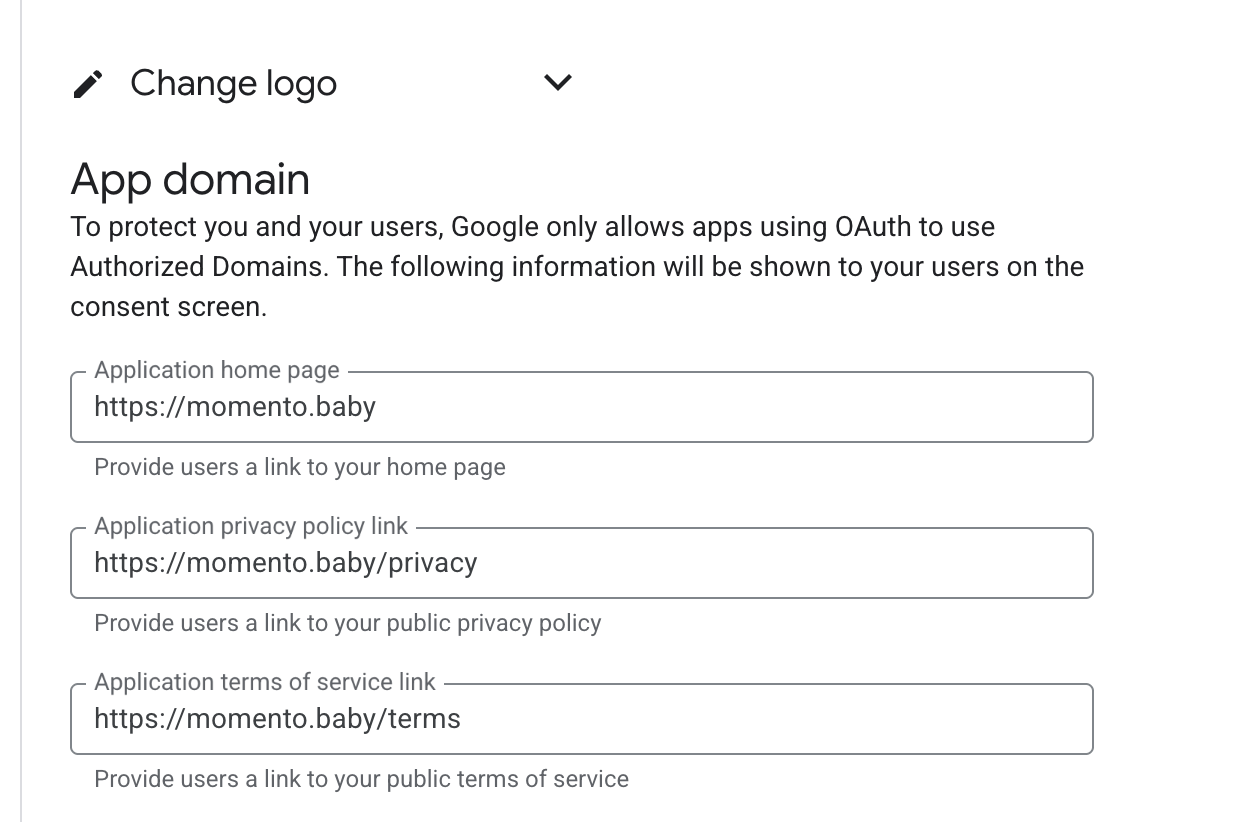 . In my case, I was just showing the logo on the landing page and I learned
that was problematic. The error you see would be something along the lines of "Your logo is not shown everywhere".
. In my case, I was just showing the logo on the landing page and I learned
that was problematic. The error you see would be something along the lines of "Your logo is not shown everywhere".
The second problem I faced was that for some reason, I pasted https://www.momento.baby for the landing page and used these URLs for the privacy policy and the terms of service:
So, Google thought that I was providing two different domains, and it also gave me some errors because of that. So, the rule of thumb here is to use the same canonical URL. I learned that by trial and error, to be honest.

Canonical URL
Ensure you pick one type of canonical URL and stick with it. Even after configuring everything, I was receiving some errors on my page and seeing zero progress. So, I thought it could be related to how I configured www.momento.baby. In so many places you see recommendations to create a DNS record to always redirect https://www.momento.baby to https://momento.baby. So I configured all the URLs above to read from https://momento.baby and added a meta tag in my HTML to tell Google that this was my preferred URL for indexing.
<link rel="canonical" href={"https://momento.baby#{@conn.request_path}"} />How will the scopes be used?
This is an optional textarea under the Data Access page. 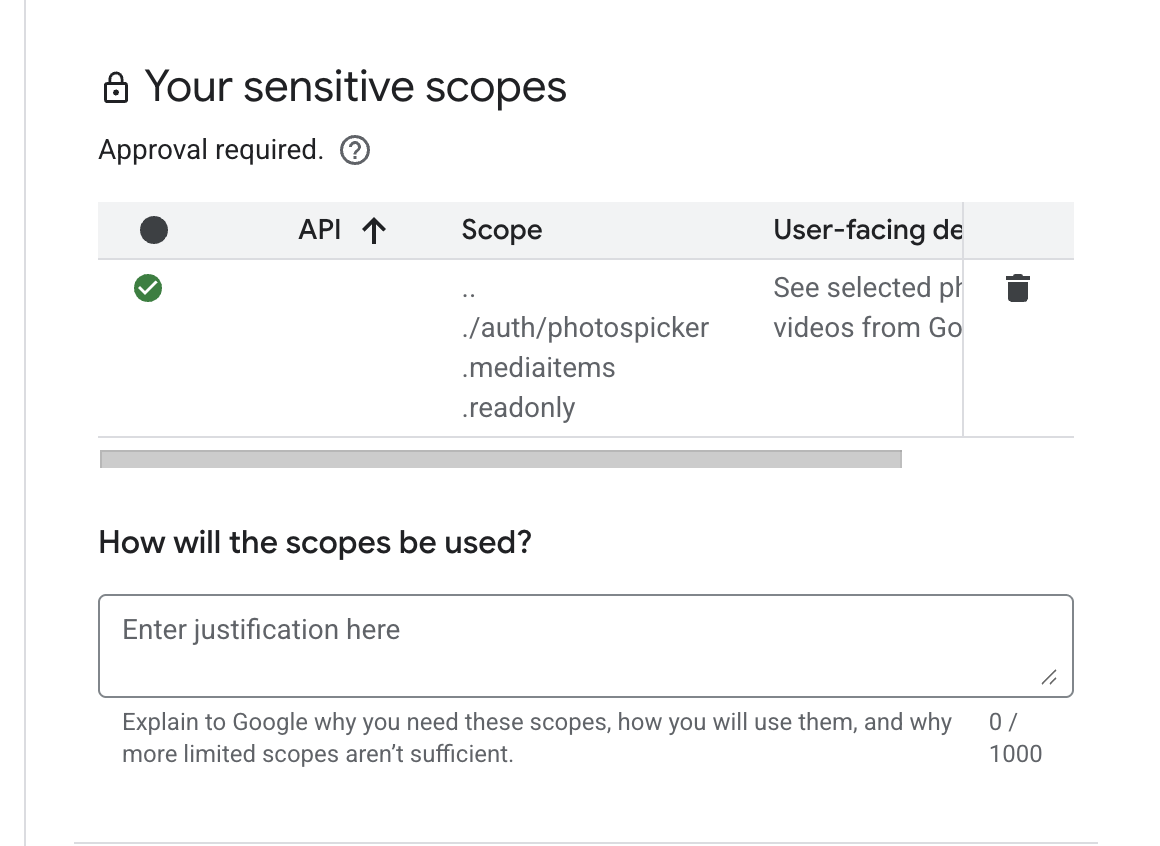 I thought this wasn't very important since the field is optional, but when you
submit your app for verification you indeed must provide an explanation about how you'll be using this scope. So be as descriptive as possible. I explained that I was
requesting the minimum access necessary to be able to grab users' photos.
I thought this wasn't very important since the field is optional, but when you
submit your app for verification you indeed must provide an explanation about how you'll be using this scope. So be as descriptive as possible. I explained that I was
requesting the minimum access necessary to be able to grab users' photos.
==========================
Quick pre-submission checklist
Before you click the submit button, double-check that:
- Your logo appears on your landing page, Privacy Policy, and Terms of Service.
- All URLs you share with Google use the same canonical domain (for example, always
https://momento.babyinstead of mixingwwwand non-www). - Your canonical URL is correctly configured (DNS + meta tag) and consistently used across all pages.
- The optional "How will the scopes be used?" field clearly explains why you need each sensitive scope and how you minimize access.
- Your public YouTube video is live and linked from your landing page.
After I did that, I saw progress after a few days and got my brand approved. I didn't describe in detail the obvious steps, which are self-explanatory from the Google's form, but here they are
- You must have a public YouTube video available. That video should also appear on your landing page
- On the authorized domain you just set momento.baby
- App name
- Email contact
Stuck in the approval loop
Since I made so many mistakes (2-3 submissions with problems), Google started preventing me from asking for more verification. I had to wait for 24 hours to click on a blue button that appears on the Branding page. Even after waiting for the 24 hours, when I clicked on it, I immediately received a follow-up email saying that my request was cancelled because I had requested the verification too soon. So I left it there for a couple of days (three to four days). At some point, I got progress on the brand verification and received feedback for the scopes verification.
The Google team responded that I had to include a few more bits on the Privacy Policy page. I had to inform all the third-party services that I would be sharing this information with. So I went ahead, made the updates and responded this time via the email I received. After two days, I got my approval.
From my first submission (with mistakes) to final approval, the whole process took three weeks. Most of that time was spent waiting between submissions and learning from unclear automated feedback.
Summary
The whole point of sharing this process was to show the roadblocks I went through and how unclear the automated feedback from Google is. So my first advice is to take your time. Don't rush and ensure that you have everything in place before submitting your app for verification because the more you resubmit, the longer it takes and the more confusing it gets.
I hope this helps you get unstuck, in case you are as I was. As an ultimate resource, I joined a Google community where you can ask for help, which might be helpful for you too. The community is called Google Developer Forums and it's free to join.