Building AI Observability Before Your First Deploy
I built Momento Baby — an AI-powered photo management app for families. The concept is simple: import photos from Google Photos, have AI analyze them to extract meaningful metadata (people, activities, emotions, objects), then let you search through your memories using natural language. Think "show me photos of happy moments outdoors" instead of scrolling through thousands of images.
The app uses GPT-4o-mini for image analysis and semantic search with embeddings. It works great in development. Photos get analyzed. Search returns relevant results. But there's one problem I haven't solved yet: I have no idea what this will cost in production.
How much will each photo analysis cost? Will users actually discover the search feature I spent two weeks building? Will my AI quality be good enough? What if I deploy and my OpenAI bill is $500 in the first week?
One of my primary concerns is keeping this economically viable. I don't want to wake up to a massive OpenAI bill that makes the project unsustainable. So before I deploy, I'm building complete observability into every layer of the app.
In this post, I'll share what I instrumented before launch — specifically, how I'm using PostHog to track the complete journey from OAuth to photo import to AI analysis to search quality.
Why Build This Before Deploying?
If you ship AI features without proper instrumentation, you're flying blind. The OpenAI dashboard will show you aggregate tokens and requests, but it won't answer the questions that actually matter:
- Economic viability: What's the cost per user? Per photo? Per search? Is this sustainable?
- User activation: Are people finding value? Do they activate? Discover features?
- Drop-off points: Where do users abandon? OAuth? Photo selection? Import?
- AI quality: Are searches returning results? Is metadata complete? Or am I paying for garbage?
- What's expensive: Which operations burn tokens? Should I optimize thumbnails? Cache embeddings?
Traditional analytics tools track user behavior. Your LLM provider tracks API calls. But nobody connects them. And if you wait until after deployment to figure this out, you might have already burned through hundreds of dollars without learning anything useful.
So I'm building observability first, then deploying.
What I'm Tracking
After researching and planning, I identified three layers of observability I needed before going to production:
1. LLM Metrics (The "Am I Going Broke?" Layer)
- Exact token counts for every API call
- Cost per operation (Vision, Embeddings, etc.)
- Latency (P50, P95, P99)
- Success/failure rates
- Trace IDs to group related operations
2. Customer Journey (The "Are People Actually Using This?" Layer)
- Activation funnel (signup → first import)
- Feature discovery (when do they find search? folders?)
- Drop-off points (where do users abandon?)
- Power user identification
3. Product Metrics (The "Is This Thing Any Good?" Layer)
- Search quality (zero-result queries)
- Import success rates
- AI metadata quality
- Performance bottlenecks
The challenge? Most analytics tools only cover #2. You're on your own for #1 and #3.
Enter PostHog
I chose PostHog because it's one of the few analytics platforms with native LLM tracking support. They have a specific event format ($ai_generation) that captures everything you need about AI operations.
But more importantly, PostHog lets you track the complete journey — from OAuth to photo import to search to AI costs — all in one place.
The Implementation
Let me show you what actually tracking AI in production looks like.
Tracking Every OpenAI Call
Here's the critical insight: OpenAI returns exact token counts in every response. You don't need to estimate. You just need to extract and track them.
Here's what an OpenAI Vision API response looks like:
{
  "id": "chatcmpl-...",
  "choices": [{"message": {"content": "..."}}],
  "usage": {
    "prompt_tokens": 1523,      // ← Image + prompt tokens (ACTUAL)
    "completion_tokens": 287,   // ← AI response tokens (ACTUAL)
    "total_tokens": 1810        // ← Total (ACTUAL)
  }
}
In my Elixir app, I extract these values and send them to PostHog:
defmodule Momento.AI.LLMMetrics do
  def extract_token_usage(response) when is_map(response) do
    usage = Map.get(response, "usage", %{})

    %{
      input_tokens: Map.get(usage, "prompt_tokens", 0),
      output_tokens: Map.get(usage, "completion_tokens", 0),
      total_tokens: Map.get(usage, "total_tokens", 0)
    }
  end

  def calculate_vision_cost(input_tokens, output_tokens) do
    # GPT-4o-mini pricing (as of 2025)
    input_cost = input_tokens * 0.150 / 1_000_000
    output_cost = output_tokens * 0.600 / 1_000_000
    Float.round(input_cost + output_cost, 6)
  end
end
Note that the input pricing is $0.150 per 1M tokens and the output: $0.600 per 1M tokens. Then I send this to PostHog using their $ai_generation event:
defmodule Momento.Analytics do
  def track_llm_vision_call(account_id, metrics) do
    Posthog.capture("$ai_generation", account_id, %{
      "$distinct_id" => account_id,
      "$ai_model" => "gpt-4o-mini",
      "$ai_provider" => "openai",
      "$ai_input_tokens" => metrics.input_tokens,
      "$ai_output_tokens" => metrics.output_tokens,
      "$ai_total_tokens" => metrics.total_tokens,
      "$ai_cost_usd" => metrics.cost_usd,
      "$ai_latency_ms" => metrics.latency_ms,
      "$ai_success" => metrics.success,
      "$ai_http_status" => metrics.http_status,
      "$ai_trace_id" => metrics.trace_id
    })
  end
end
The Magic of Trace IDs
Here's something clever: every photo import involves two AI operations:
- Vision API call (analyze image)
- Embedding API call (generate search vector)
By using the same trace_id for both, PostHog automatically groups them together. This gives you end-to-end visibility for each photo import.
# In the photo import worker
trace_id = "photo_import_#{photo_id}_#{System.system_time(:millisecond)}"

# Vision call uses this trace_id
ImageAnalyzer.call_openai_vision(thumbnail, trace_id: trace_id)

# Embedding call uses the SAME trace_id
Embeddings.generate_embedding(description, trace_id: trace_id)
Now in PostHog, I can see:
- Total cost for importing a photo
- Total tokens
- Total time
This is gold when you're trying to optimize costs.
Tracking the Customer Journey
LLM metrics are great, but they don't tell you if users are actually using your features. For that, I track every important user action:
Authentication
# When user clicks "Connect Google Photos"
Analytics.track_google_auth_started(account_id)

# When OAuth succeeds
Analytics.track_google_auth_completed(account_id, email)

# When OAuth fails
Analytics.track_google_auth_failed(account_id, error_reason)
Import Workflow
# When user opens photo picker
Analytics.track_picker_opened(account_id)

# When photos are selected
Analytics.track_picker_photos_selected(account_id, photo_count)

# When import starts
Analytics.track_import_started(account_id, photo_count)

# For each photo (in the background worker)
Analytics.track_import_success(account_id, %{
  photo_id: photo_id,
  file_size: file_size,
  compression_ratio: compression_ratio,
  ai_processing_time: ai_time,
  total_processing_time: total_time
})
Now I can track:
- When did users first use search?
- When did they create their first folder?
- When did they organize their first photo?
This tells me if my onboarding is working or if features are hidden.
The Funnels I'm Building
With both user actions and AI operations tracked, I can build funnels that will tell me what's actually happening in production.
1. Activation Funnel
Landing → Auth Started → Auth Success →
Picker Opened → Photos Selected → Import Started →
First Photo Success
This shows where users drop off. Are they abandoning at OAuth? During photo selection? After import?
3. AI Quality Funnel
AI Analysis → Has Description → Has Objects →
Has People → Has Activities
This tracks AI performance. What percentage of photos get complete metadata? Where is my AI weak? This matters because bad AI is expensive even if the per-call cost is low.
Why This Approach
Building observability before deploying might seem like over-engineering, but here's why I'm doing it:
1. Economic Viability First
Without cost tracking from day one, I won't know if this project is sustainable.
2. Trace IDs for True Cost
Grouping related AI operations (Vision + Embedding for a photo) shows the true cost of a workflow, not just individual operations. This is critical for finding optimization opportunities.
3. Quality Metrics, Not Just Cost
Token counts matter, but AI quality matters more. What percentage of photos get complete metadata? Are searches returning results?
4. Feature Discovery from Day One
Do users who find search early stick around? This affects retention and product decisions.
5. Real Token Counts, Not Estimates
OpenAI returns exact token usage in every response. I'm extracting it and sending it to PostHog. My analytics should match my OpenAI bill exactly — no surprises.
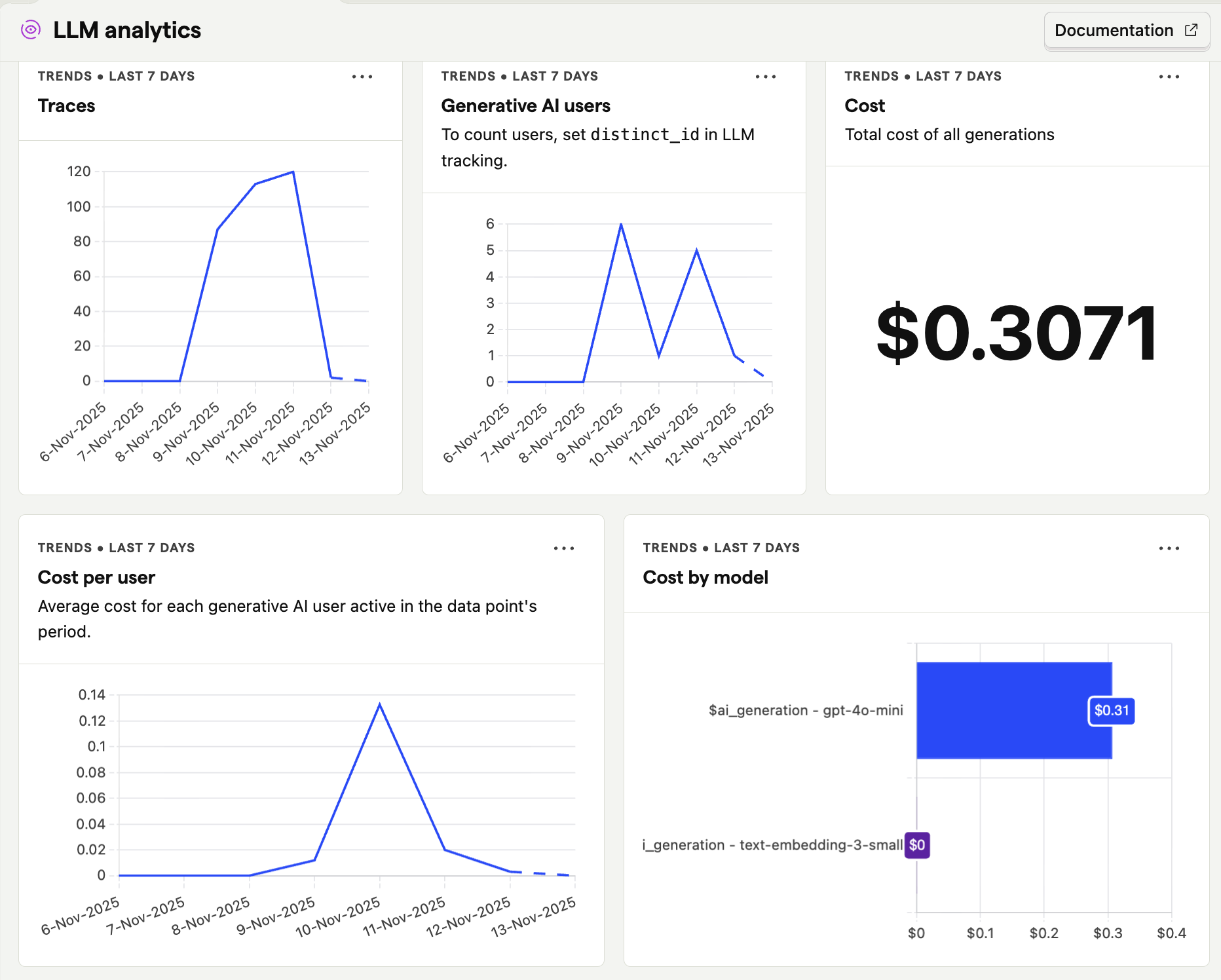
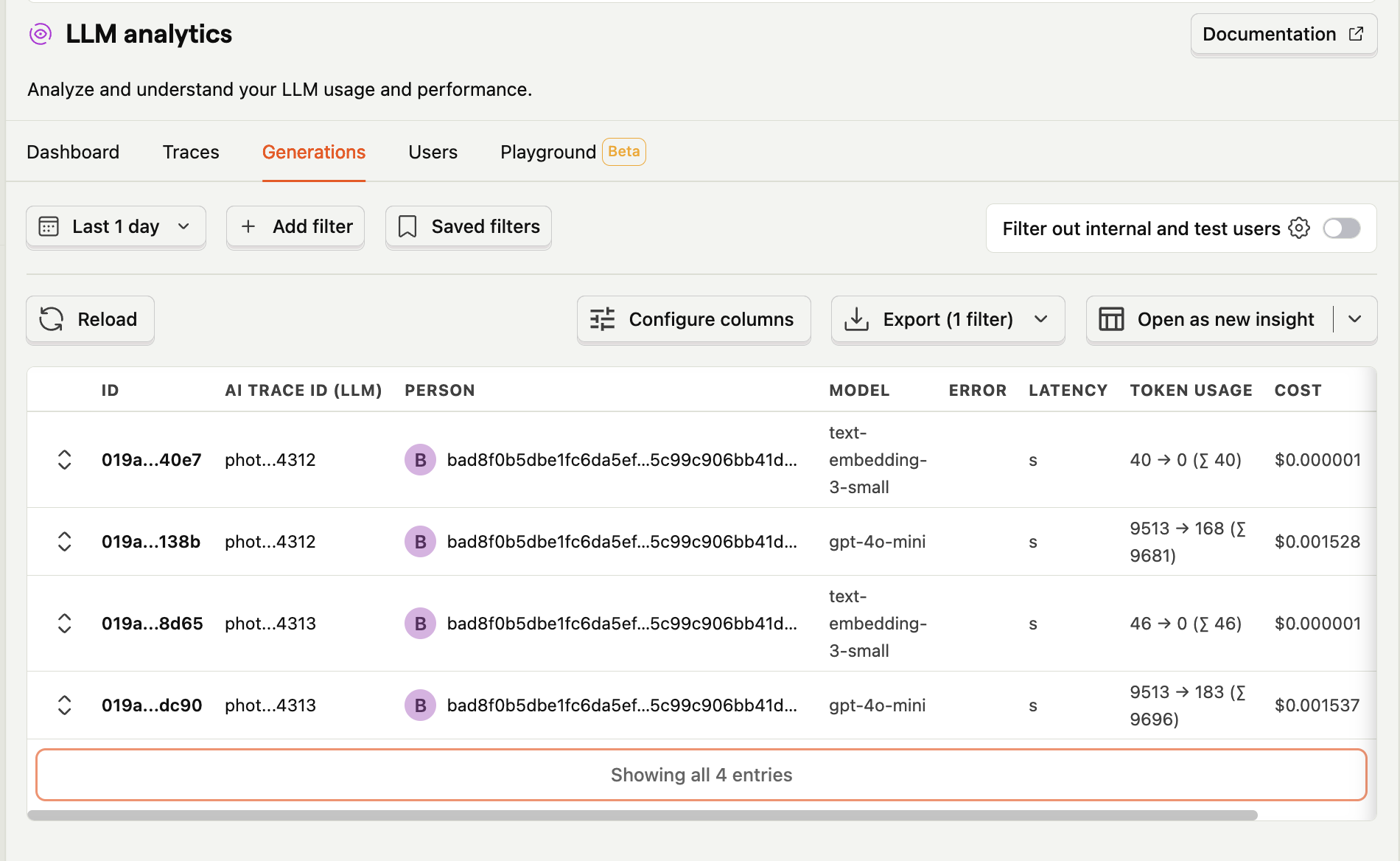
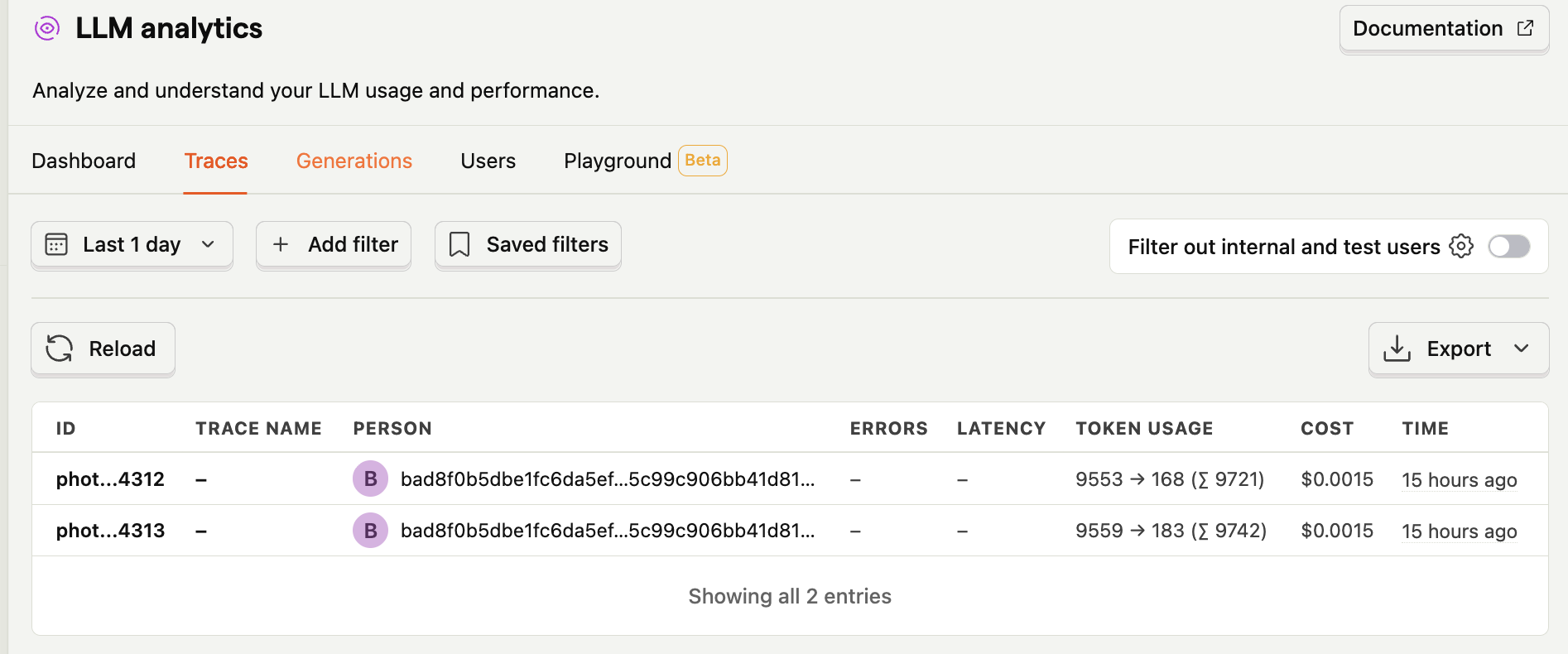
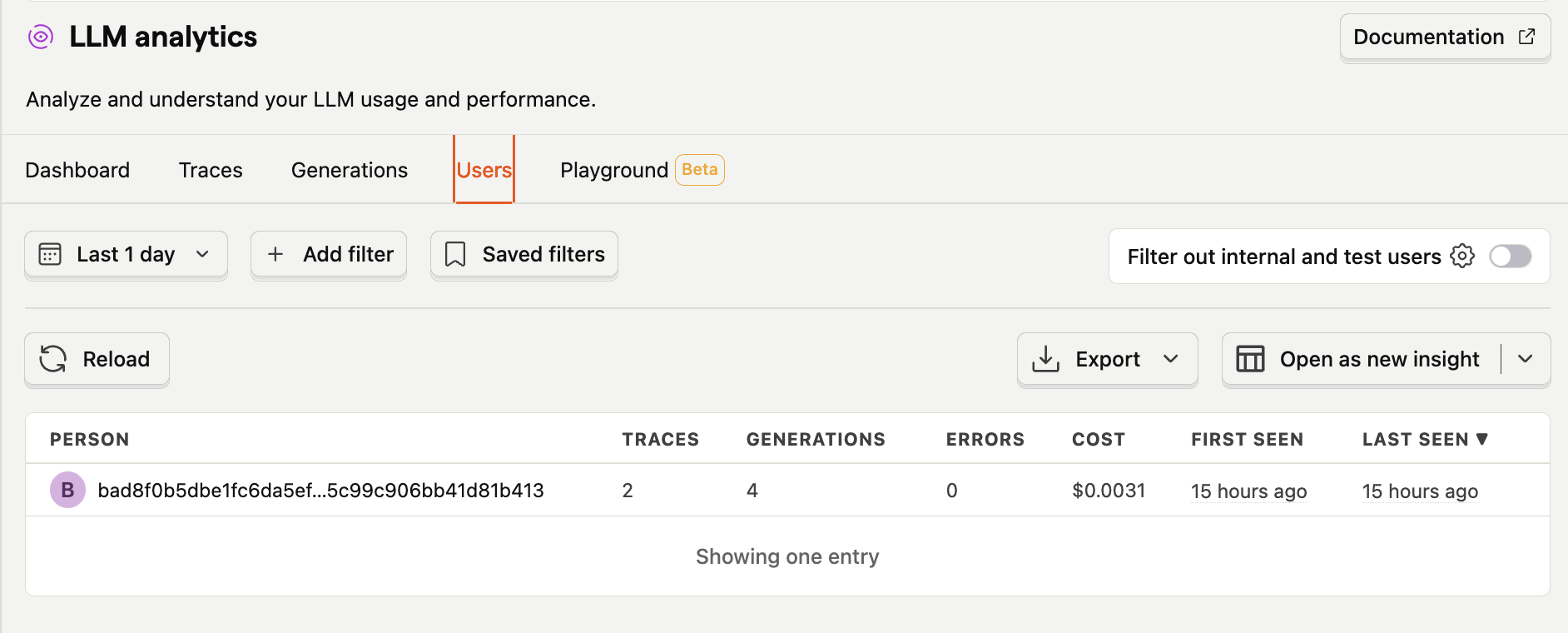
How it looks like in production
Conclusion
If you're building AI features, don't deploy without observability. You need to track:
- User behavior (activation, discovery, retention)
- AI performance (tokens, costs, latency, quality)
- Economic viability (is this sustainable?)
The key insight? Build tracking before deploying, not after. Your OpenAI dashboard won't tell you if users are finding value.
PostHog's LLM tracking ($ai_generation events) makes this possible in one platform. Combined with proper trace IDs and customer journey tracking, you get complete observability before your first user.
Your future self (and your bank account) will thank you.
Key Takeaways
What to Track:
- Every AI API call with actual token counts (extract from OpenAI response)
- Trace IDs to group related operations (Vision + Embedding = one photo import)
- Customer journey from landing to activation to power user
- AI quality metrics (complete metadata, search results, etc.)
How PostHog Helps:
- Native LLM tracking (
$ai_generationevents) - Trace support (group related AI operations)
- Full customer journey in one platform
- User properties for cohort analysis
- Funnel visualization for drop-off analysis